Twinkle, Don’t Smudge: Phone Settings for Clear UK Christmas Market Stalls
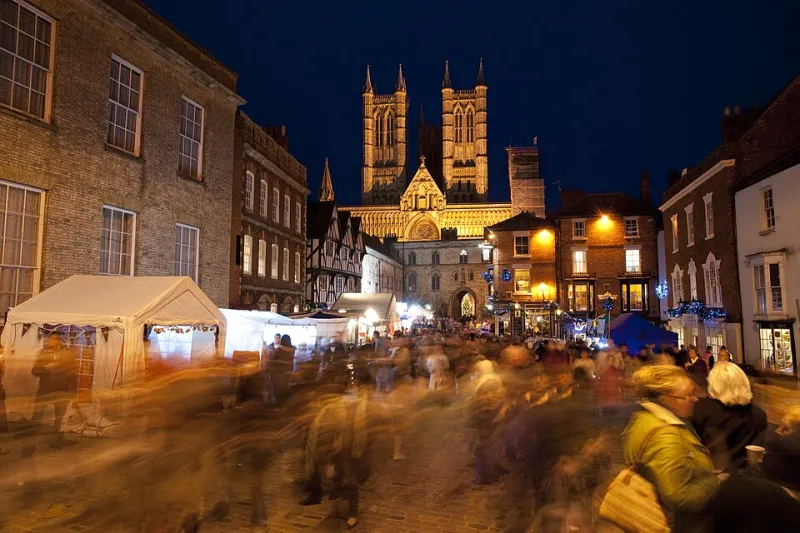
Photo: Virgin Trains East Coast, CC BY 3.0, via Wikimedia Commons
A UK Christmas market at dusk is a beautiful problem. The lights are warm, the crowds are moving, and your phone wants to turn every stall into a soft-focus memory. The fix is not a better phone. It is a better order of operations. Here is the PhotoClear list for shooting twinkly stalls without losing the details that make them worth photographing.
1. Ask before you frame the stall
This is not a setting, but it matters more than one. Traders are at work. Ask if you can take a photo of the stall, especially if you plan to use it for a business, blog or social media. Respect a no. Avoid close-ups of customers' faces without permission, and do not move stock or signage to get a better angle. If you are shooting for a small business client, ask the trader if they would like a copy; it is a small gesture that keeps the market friendly.
2. Clean the lens and use the main camera
A fingerprinted lens turns fairy lights into glowing fog. Wipe it with a microfibre cloth. Then switch to the 1x main camera. The ultra-wide is tempting for a whole stall, but it distorts edges and gathers less light. Digital zoom is worse: it crops and softens. Step closer instead, or accept that the stall is part of a wider scene.
3. Tap and hold to lock exposure and focus
Tap the stall sign, a product or a face, then hold until the phone locks focus and exposure. Drag the exposure slider down a notch. Christmas lights are bright, and your phone will happily blow them out to make the shadows brighter. Protect the highlights first; you can lift the shadows in editing. If the phone loses the lock when people walk through, tap and hold again.
4. Use night mode deliberately
Night mode is excellent for static stalls, mulled wine signs and empty market lanes. It is less good for moving crowds. If people are walking through the frame, the long exposure will turn them into ghosts. For moving scenes, switch night mode off or shorten it, raise the ISO if your phone allows, and accept a little grain. A sharp, noisy photo of a busy stall is usually more useful than a smooth, blurry one.
On iPhone, tap the night mode icon and adjust the exposure time. On Android, Night Sight or Night mode works similarly. Brace the phone against something solid and hold still. If the phone says hold still, believe it.
5. Stabilise like you mean it
Stand with your feet apart. Tuck your elbows in. Hold the phone with both hands and press it gently against your chest. Breathe out before you tap the shutter. Use the 2-second timer if your hands are cold. For moving subjects, take a short burst and choose the sharpest frame later. If there is a lamppost, table or shop window, lean on it. Do not step into the middle of a crowded walkway to get a steadier shot; it is not worth it.
6. When to use a small tripod
A small tripod or phone clamp is worth packing for static stall details, signage and product shots. It lets you use a longer night-mode exposure and keep the text crisp. Ask the trader first, keep it out of the walkway, and do not set up in front of a queue. A mini tripod on a table is often enough. Avoid full-size tripods in crowded markets unless you have permission and space; they are a trip hazard and a mood killer.
7. Watch the exposure compensation
Most phones let you lower exposure by tapping and dragging. Start at -0.3 or -0.7 EV. This keeps fairy lights from turning into white blobs and preserves the colour of mulled wine, scarves and wooden signs. If the stall is very dark, do not panic and raise exposure too far; a slightly dark photo with detail is easier to rescue than a blown-out one.
8. Keep the colours warm but honest
Auto white balance often overcorrects warm market lights and makes everything look grey. If your phone has a warm preset, try it, but check skin tones and reds. In editing, add a little warmth, but stop before the wooden stalls look orange. A small shift in tint can help if the LEDs look green. Use vibrance rather than saturation, and keep an eye on the whites of signs and price tags.
9. Edit for clarity, not crunch
A simple market edit works best. Crop and straighten first. Bring highlights down to recover the lights, lift shadows a little, and adjust white balance. Add a modest amount of clarity or texture, then back off. Too much clarity makes tinsel look like barbed wire. Use noise reduction carefully; it can smear lettering. Sharpen last and only slightly. If the stall sign is the point of the photo, check that the words are still readable at 100% before you post.
10. A quick market checklist
- Ask the trader before photographing a stall.
- Wipe the lens and use the 1x camera.
- Tap and hold to lock focus and exposure.
- Lower exposure slightly to protect fairy lights.
- Use night mode for static scenes, not moving crowds.
- Brace against a wall, table or lamppost.
- Pack a mini tripod for static details.
- Avoid digital zoom; step closer instead.
- Edit warmth gently and keep signs legible.
- Back up your best shots before the mulled wine kicks in.
Christmas markets are meant to feel warm and busy. Your photos can feel that way too, as long as the details stay clear. Lock the exposure, steady the phone, and edit with restraint. The twinkle will look after itself.